FlutterFlow: The new low-code builder for mobile apps
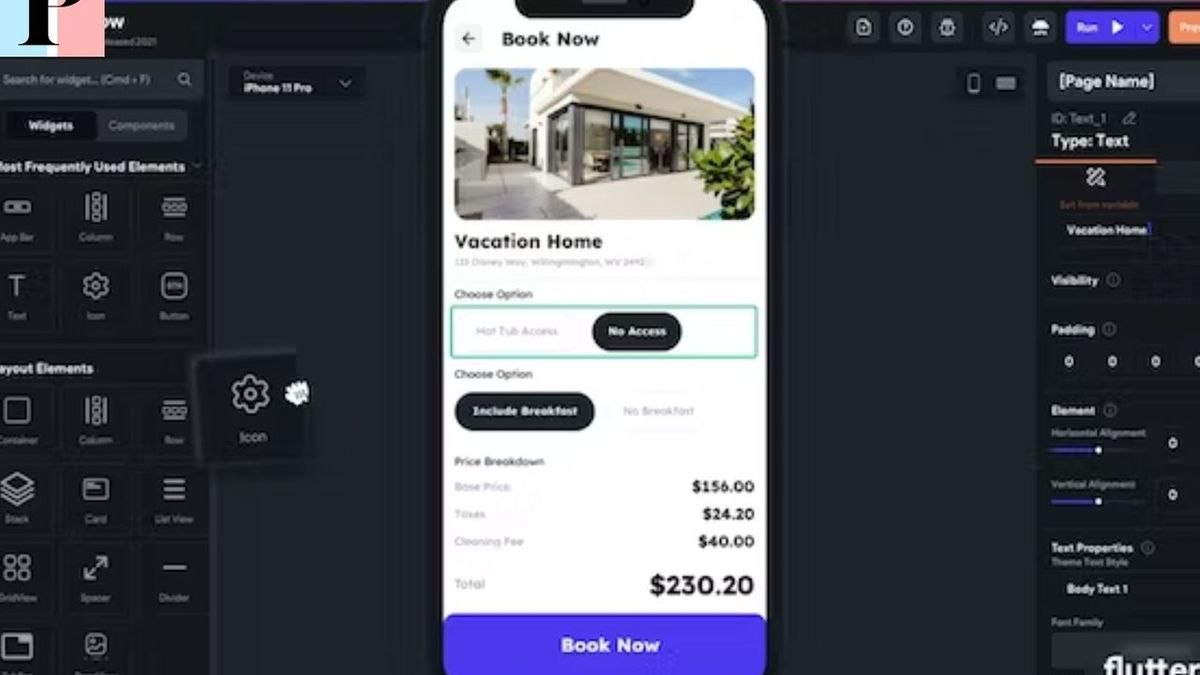
Mobile developers are looking for new, faster and easier ways to build apps.
FlutterFlow is an innovative solution that offers an intuitive tool for mobile application development with features, code and widgets on a single framework.
FlutterFlow software: a low-code builder for mobile applications
L'NOCODE tool FlutterFlow is a mobile application development platform based on the framework Flutter in no code version and aims to facilitate the creation of a mobile application from A to Z. With an interface drag and drop Designed to be as simple as possible, FlutterFlow lets you build your app 10x faster than traditional development. Many developers choose FlutterFlow as their primary tool because it offers great features that make their work easier. FlutterFlow is therefore a useful tool for developers looking to save time in managing their mobile application development project. Read also: 5 Innovative Ways to Explore the Benefits of WhatsAppWhat is FlutterFlow and how does it work?
FlutterFlow is a low-code builder that makes programming easy and allows developers to generate native web and mobile apps very quickly. The tool offers pre-built widgets that can be customized to create the desired application. Users can also download and modify existing templates as needed.The main features offered by FlutterFlow are:
- Cloud integration
- Widget-rich library
- Access to an open and manageable code base
- Cross-platform support thanks to its compatibility with Android and iOS
Key features of FlutterFlow for mobile app development
- Drag and Drop Interface: An intuitive interface allowing users to drag and drop objects directly onto the page to begin the development process.
- Widget Library: A wide variety of different widgets available to personalize your application down to the smallest detail.
- Open Source Database: An open source base coded in native language that can be easily integrated and modified.
The basis of FlutterFlow: the Flutter framework in no code version
What is Flutter framework?
The framework Flutter is an open-source framework created by Google for developing mobile applications for both iOS and Android. It includes a variety of ready-to-use libraries to allow developers to speed up the process and increase productivity.How is it integrated into FlutterFlow?
The Flutter framework is integrated into FlutterFlow to provide a comprehensive and user-friendly platform for mobile app builders. Key features of the Flutter framework, such as the drag and drop interface, are integrated directly into FlutterFlow to help users build their apps quickly and easily.The benefits of the Flutter framework base for mobile app builders
- Native application without restrictions: Using the Flutter framework allows the user to create complete native applications without any restrictions.
- A widget-rich experience: The widgets included in the Flutter framework offer a wide range of possibilities for customizing your application.
- Convenient access to source code: The source code of the Flutter framework can be modified very easily thanks to the intuitive interface offered by this NOCODE tools also called low code tools.
FlutterFlow vs Traditional Development:
How FlutterFlow helps manage mobile app development projects faster and easier.The stages of developing a mobile application with FlutterFlow
The development process is divided into three distinct stages: design, construction and configuration. Each step can be carried out very quickly thanks to the power offered by the tool.- Design: Users can choose from pre-designed templates to quickly start the process.
- Construction: Developers can add additional features and modify the interface using built-in widgets.
- Configuration: Once the changes are made, users can configure different settings such as theme, colors, and other customization options.
Management modes available in FlutterFlow for mobile application development projects
FlutterFlow offers several management modes to facilitate project management. These modes include:- Manual mode: Users can manage their projects themselves using the drag and drop interface and rich widget library.
- Automatic mode: The user can automate certain tasks by defining frameworks or special conditions.
- Web mode: FlutterFlow allows developers to build a complete online presence with a comprehensive system of administrative tools.
The Benefits of Using FlutterFlow Over Traditional Development for Mobile App Developers
- Reduced time: The time required to create a mobile application is significantly reduced using FlutterFlow.
- Flexibility: The platform offers great flexibility and ease of use – which is not always the case with traditional development.
- Reduced costs: This NOCODE tool allows users to significantly reduce the costs associated with the development and maintenance of a project thanks to its attractive prices.
Why not use flutterflow?
FlutterFlow is a low-code app development tool that lets you build beautiful, native apps quickly and easily. You can use its simple drag-and-drop interface to build your app 10x faster than traditional development. FlutterFlow also lets you easily integrate data and APIs, translate your app into multiple languages, customize anything you want, and deploy your app to app stores or the web in one click. FlutterFlow is used by users in large enterprises around the world and has received positive customer testimonials. Why not use FlutterFlow ? Maybe because you prefer to code yourself, or because you need specific features that are not supported by FlutterFlow, or because you are unfamiliar with Flutter, the framework on which FlutterFlow is based . These are valid reasons, but I think FlutterFlow is worth a try if you want to build apps quickly and easily. The best way to start is to take a flutterflow training complete dispensed by a professional like Djiby Sensei.What are the advantages of FlutterFlow over other tools?
FlutterFlow has several advantages over other app development tools. Here are some of them: • FlutterFlow is based on Flutter, a mobile and web application development framework created by Google, which offers native performance, attractive design and a fast development cycle with hot reloading. • FlutterFlow is a low-code tool, meaning it lets you build apps without writing a single line of code, using a visual drag-and-drop interface and pre-built components. • FlutterFlow is more accessible to non-technical users than Flutter, which requires a certain level of technical expertise to use effectively. • FlutterFlow is more scalable than other tools like Glide because it can handle millions of records, which means more users of your app. In contrast, Glide can only keep tens of thousands of records. • FlutterFlow lets you publish your app to app stores or the web in one click, without the need to configure additional tools. • FlutterFlow also lets you translate your app into multiple languages with the click of a button using Google Translate. However, FlutterFlow also has some disadvantages compared to other tools. Here are some of them: • FlutterFlow is not as flexible as Flutter because it uses pre-built components. It is not well suited for creating highly customized or complex applications. • FlutterFlow is more difficult to configure than Glide, because it uses Firebase as its backend. If you don't have an experienced software developer or graphic designer, 's wide selection of ready-to-use templates Glide will make creating an application easier. • FlutterFlow has a higher learning curve than Glide, as it requires some familiarity with Flutter, the framework on which it is based. In summary, FlutterFlow is a powerful and fast tool for creating mobile and web applications, but it also has its limitations. It is suitable for users who want to create simple, standard applications without much customization, but it may not be suitable for users who want to create very personalized or complex applications.How can I integrate data and APIs into my application with FlutterFlow?
To integrate data and APIs into your app with FlutterFlow, you can use the following features: • API calls : Allow you to create applications that can interact with external services using their APIs. For example, you can create a weather app that displays current weather information using the Weather API or weatherapi. You can choose from different types of HTTP requests (GET, POST, DELETE, etc.) and configure the request parameters, headers and body. You can also manage the API response and use it to update your app's data or widgets. • Integrations: allow you to connect your application to Algolia, Google Analytics, Google Maps and Admob. You can also connect your project to the Github repository to manage custom code. These integrations allow you to add additional features to your app, such as search, analytics, mapping, and advertising. • The API call request : allows you to trigger an API call automatically as soon as the page or widget is loaded. This is useful if you want to retrieve data from an API call and display it on a page or widget. For example, displaying a list of articles in a ListView, displaying user details on multiple Text widgets. If you want to know more about these features, you can check out the FlutterFlow documentation in English or watch video tutorials on his YouTube channel. Hope this helps you build your app with FlutterFlowArticles similaires




Software